

https://www.examtopics.com/exams/microsoft/ms-500/view/
Note: This question is part of series of questions that present the same scenario. Each question in the series contains a unique solution that might meet the stated goals. Some question sets might have more than one correct solution, while others might not have a correct solution.
After you answer a question in this section, you will NOT be able to return to it. As a result, these questions will not appear in the review screen.
You have a Microsoft 365 E5 subscription that is associated to a Microsoft Azure Active Directory (Azure AD) tenant named contoso.com.
You use Active Directory Federation Services (AD FS) to federate on-premises Active Directory and the tenant. Azure AD Connect has the following settings:
✑ Source Anchor: objectGUID
✑ Password Hash Synchronization: Disabled
✑ Password writeback: Disabled
✑ Directory extension attribute sync: Disabled
✑ Azure AD app and attribute filtering: Disabled
✑ Exchange hybrid deployment: Disabled
✑ User writeback: Disabled
You need to ensure that you can use leaked credentials detection in Azure AD Identity Protection.
Solution: You modify the Azure AD app and attribute filtering settings.
Does that meet the goal?
- A.Yes
- B.No - correct
Explanation:
Specific details on PHS and ADFS:
https://docs.microsoft.com/en-us/azure/active-directory/hybrid/whatis-phs
https://www.microsoft.com/security/blog/2019/05/30/demystifying-password-hash-sync/
Leaked credentials detection in Azure AD Identity Protection requires Password Hash Sync enabled in Azure AD Connect
Protect against leaked credentials and add resilience against outages If your organization uses a hybrid identity solution with pass-through authentication or federation, then you should enable password hash sync for the following two reasons: The Users with leaked credentials report in the Azure AD management warns you of username and password pairs, which have been exposed on the "dark web." An incredible volume of passwords is leaked via phishing, malware, and password reuse on third-party sites that are later breached. Microsoft finds many of these leaked credentials and will tell you, in this report, if they match credentials in your organization – but only if you enable password hash sync!
===================================================================
Question #2
You have a Microsoft 365 subscription that uses a default domain name of contoso.com.
The multi-factor authentication (MFA) service settings are configured as shown in the exhibit. (Click the Exhibit tab.)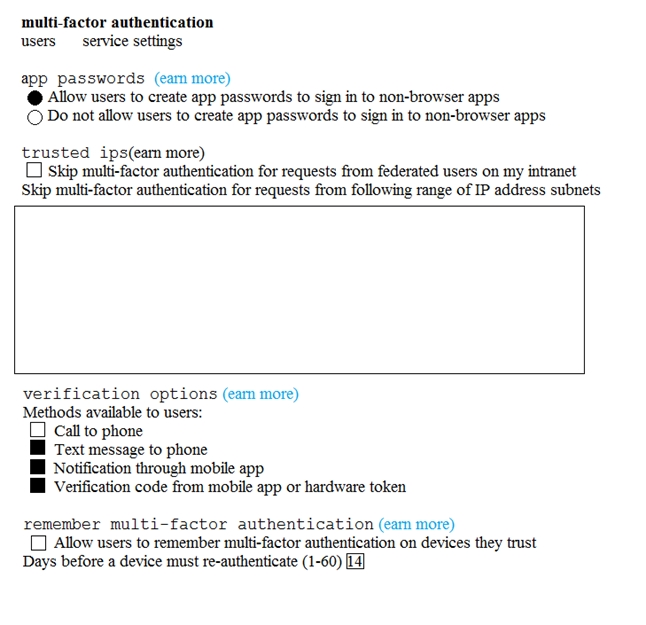
In contoso.com, you create the users shown in the following table.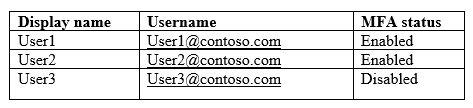
What is the effect of the configuration? To answer, select the appropriate options in the answer area.
NOTE: Each correct selection is worth one point.
Hot Area: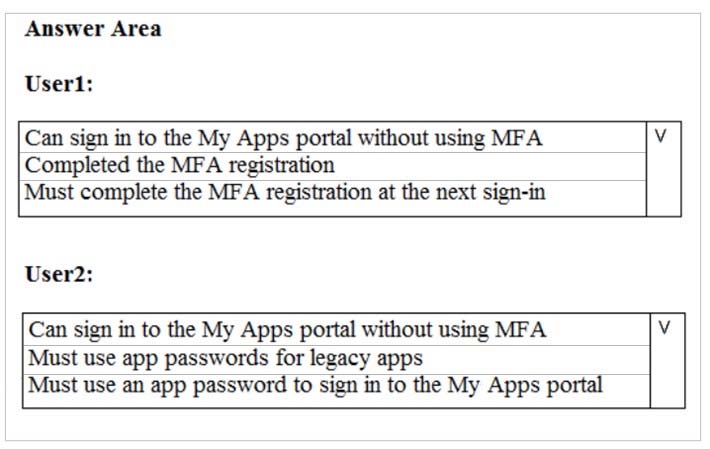
Correct Answer: 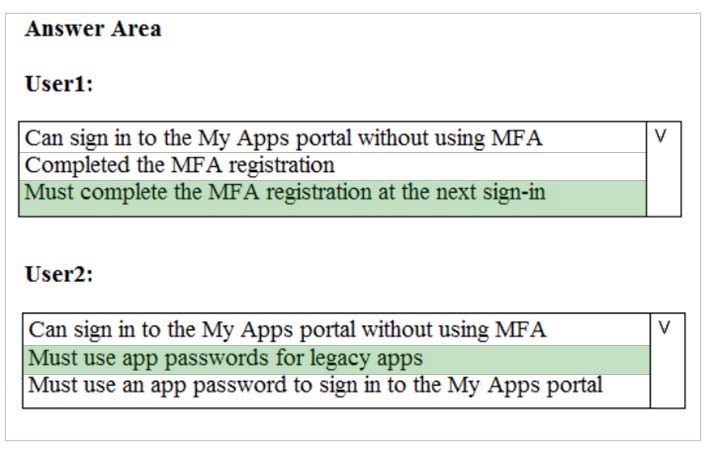
References:
https://docs.microsoft.com/en-us/azure/active-directory/authentication/howto-mfa-userstates

HOTSPOT -
You configure Microsoft Azure Active Directory (Azure AD) Connect as shown in the following exhibit.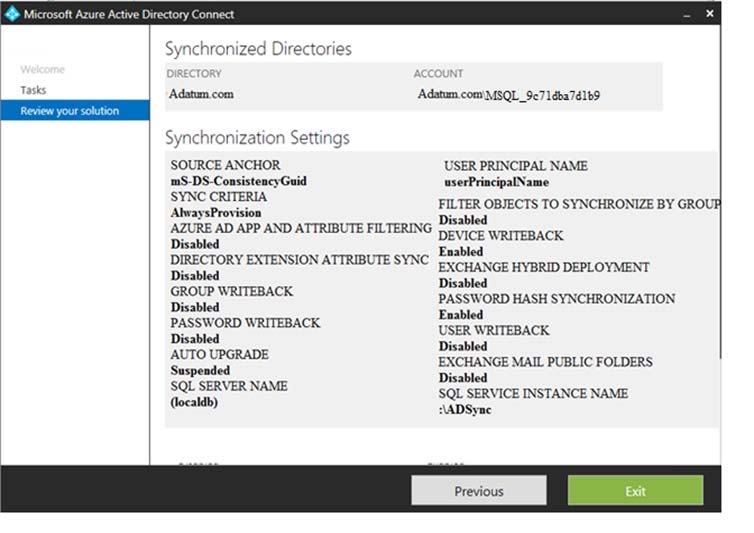
Use the drop-down menus to select the answer choice that completes each statement based on the information presented in the graphic.
NOTE: Each correct selection is worth one point.
Hot Area:
Correct Answer:
Reference:
https://docs.microsoft.com/en-us/azure/active-directory/hybrid/how-to-connect-device-writebac
k
You have a hybrid Microsoft 365 environment. All computers run Windows 10 and are managed by using Microsoft Intune.
You need to create a Microsoft Azure Active Directory (Azure AD) conditional access policy that will allow only Windows 10 computers marked as compliant to establish a VPN connection to the on-premises network.
What should you do first?
- A. From the Azure Active Directory admin center, create a new certificate
- B. Enable Application Proxy in Azure AD
- C. From Active Directory Administrative Center, create a Dynamic Access Control policy
- D. From the Azure Active Directory admin center, configure authentication methods
Correct Answer: A
Reference:
https://docs.microsoft.com/en-us/windows-server/remote/remote-access/vpn/ad-ca-vpn-connectivity-windows10
You have a Microsoft 365 subscription.
From the Microsoft 365 admin center, you create a new user.
You plan to assign the Reports reader role to the user.
You need to see the permissions of the Reports reader role.
Which admin center should you use?
- A. Azure Active Directory
- B. Cloud App Security
- C. Security & Compliance
- D. Microsoft 365
Correct Answer: A
You have a Microsoft 365 subscription.
You need to ensure that all users who are assigned the Exchange administrator role have multi-factor authentication (MFA) enabled by default.
What should you use to achieve the goal?
- A. Security & Compliance permissions
- B. Microsoft Azure Active Directory (Azure AD) Privileged Identity Management
- C. Microsoft Azure AD group management
- D. Microsoft Office 365 user management
Correct Answer: B
Your company has a Microsoft 365 subscription.
The company forbids users to enroll personal devices in mobile device management (MDM).
Users in the sales department have personal iOS devices.
You need to ensure that the sales department users can use the Microsoft Power BI app from iOS devices to access the Power BI data in your tenant.
The users must be prevented from backing up the app's data to iCloud.
What should you create?
- A. a conditional access policy in Microsoft Azure Active Directory (Azure AD) that has a device state condition
- B. an app protection policy in Microsoft Intune
- C. a conditional access policy in Microsoft Azure Active Directory (Azure AD) that has a client apps condition
- D. a device compliance policy in Microsoft Intune
Correct Answer: B
HOTSPOT -
You have a Microsoft 365 E5 subscription.
Users and device objects are added and removed daily. Users in the sales department frequently change their device.
You need to create three following groups:
The solution must minimize administrative effort.
What is the minimum number of groups you should create for each type of membership? To answer, select the appropriate options in the answer area.
NOTE: Each correct selection is worth one point.
Hot Area:
Correct Answer: 1, 2
References:
https://github.com/MicrosoftDocs/azure-docs/blob/master/articles/active-directory/users-groups-roles/groups-dynamic-membership.m
d
Your company has a main office and a Microsoft 365 subscription.
You need to enforce Microsoft Azure Multi-Factor Authentication (MFA) by using conditional access for all users who are NOT physically present in the office.
What should you include in the configuration?
- A. a user risk policy
- B. a sign-in risk policy
- C. a named location in Azure Active Directory (Azure AD)
- D. an Azure MFA Server
Correct Answer: C
HOTSPOT -
You have a Microsoft Azure Active Directory (Azure AD) tenant named contoso.com that contains the users shown in the following table.
You create and enforce an Azure AD Identity Protection user risk policy that has the following settings:
✑ Assignments: Include Group1, Exclude Group2
✑ Conditions: Sign in risk of Low and above
✑ Access: Allow access, Require password change
You need to identify how the policy affects User1 and User2.
What occurs when User1 and User2 sign in from an unfamiliar location? To answer, select the appropriate options in the answer area.
NOTE: Each correct selection is worth one point.
Hot Area:
Correct Answer: 
HOTSPOT -
You have a Microsoft Azure Active Directory (Azure AD) tenant named contoso.com that contains the users shown in the following table.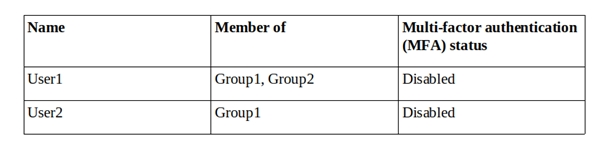
You create and enforce an Azure AD Identity Protection sign-in risk policy that has the following settings:
✑ Assignments: Include Group1, Exclude Group2
✑ Conditions: Sign in risk of Low and above
✑ Access: Allow access, Require password multi-factor authentication
You need to identify how the policy affects User1 and User2.
What occurs when each user signs in from an anonymous IP address? To answer, select the appropriate options in the answer area.
NOTE: Each correct selection is worth one point.
Hot Area:
Correct Answer: 
Question #14Topic 1
You have an on-premises Active Directory domain named contoso.com.
You install and run Azure AD Connect on a server named Server1 that runs Windows Server.
You need to view Azure AD Connect events.
You use the Security event log on Server1.
Does that meet the goal?
- A. Yes
- B. No
Correct Answer: B
References:
https://support.pingidentity.com/s/article/PingOne-How-to-troubleshoot-an-AD-Connect-Instance
You use the Directory Service event log on Server1.
Does that meet the goal?
- A. Yes
- B. No
Correct Answer: B
References:
https://support.pingidentity.com/s/article/PingOne-How-to-troubleshoot-an-AD-Connect-Instance
You use the System event log on Server1.
Does that meet the goal?
- A. Yes
- B. No
Correct Answer: B
References:
https://support.pingidentity.com/s/article/PingOne-How-to-troubleshoot-an-AD-Connect-Instance
You use the Application event log on Server1.
Does that meet the goal?
- A. Yes
- B. No
Correct Answer: A
References:
https://support.pingidentity.com/s/article/PingOne-How-to-troubleshoot-an-AD-Connect-Instance
https://docs.microsoft.com/en-us/troubleshoot/azure/active-directory/installation-configuration-wizard-errors - under the heading "Troubleshooting additional error messages", it makes specific mention that DIRECTORY SYNCHRONIZATION LOGGING can be found under the Application log
You have a Microsoft 365 E5 subscription without a Microsoft Azure subscription.
Some users are required to use an authenticator app to access Microsoft SharePoint Online.
You need to view which users have used an authenticator app to access SharePoint Online. The solution must minimize costs.
What should you do?
- A.From the Enterprise applications blade of the Azure Active Directory admin center, view the audit logs
- B.From Azure Log Analytics, query the logs
- C.From the Azure Active Directory admin center, view the audit logs
- D.From the Enterprise applications blade of the Azure Active Directory admin center, view the sign-ins
Correct Answer:D
HOTSPOT -
You have a Microsoft 365 subscription that contains the users shown in the following table.
You implement Azure Active Directory (Azure AD) Privileged Identity Management (PIM).
From PIM, you review the Application Administrator role and discover the users shown in the following table.
The Application Administrator role is configured to use the following settings in PIM:
✑ Maximum activation duration: 1 hour
✑ Notifications: Disable
✑ Incident/Request ticket: Disable
✑ Multi-Factor Authentication: Disable
✑ Require approval: Enable
✑ Selected approver: No results
For each of the following statements, select Yes if the statement is true. Otherwise, select No.
NOTE: Each correct selection is worth one point.
Hot Area: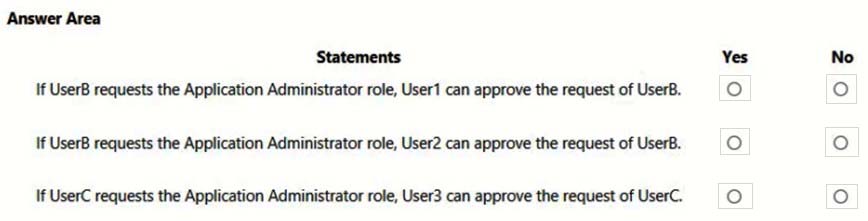
Correct Answer:
You configure several Advanced Threat Protection (ATP) policies in a Microsoft 365 subscription.
You need to allow a user named User1 to view ATP reports in the Threat management dashboard.
Which role provides User1 with the required role permissions?
- A. Security reader
- B. Message center reader
- C. Compliance administrator
- D. Information Protection administrator
- E. Service administrator
- F. Exchange administrator
Correct Answer: A
Reference:
https://docs.microsoft.com/en-us/office365/securitycompliance/view-reports-for-atp#what-permissions-are-needed-to-view-the-atp-reports
You have a Microsoft 365 Enterprise E5 subscription.
You use Windows Defender Advanced Threat Protection (Windows Defender ATP). You plan to use Microsoft Office 365 Attack simulator.
What is a prerequisite for running Attack simulator?
- A. Enable multi-factor authentication (MFA)
- B. Configure Advanced Threat Protection (ATP)
- C. Create a Conditional Access App Control policy for accessing Office 365
- D. Integrate Office 365 Threat Intelligence and Windows Defender ATP
Correct Answer: A
Reference:
https://docs.microsoft.com/en-us/office365/securitycompliance/attack-simulator
You have a Microsoft 365 E5 subscription and a hybrid Microsoft Exchange Server organization.
Each member of a group named Executive has an on-premises mailbox. Only the Executive group members have multi-factor authentication (MFA) enabled. Each member of a group named Research has a mailbox in Exchange Online.
You need to use Microsoft Office 365 Attack simulator to model a spear-phishing attack that targets the Research group members.
The email address that you intend to spoof belongs to the Executive group members.
What should you do first?
- A.From Azure ATP admin center, configure the primary workspace settings
- B.From the Microsoft Azure portal, configure the user risk settings in Azure AD Identity Protection
- C.Enable MFA for the Research group members
- D.Migrate the Executive group members to Exchange Online
Correct Answer:C
Reference:
https://docs.microsoft.com/en-us/office365/securitycompliance/attack-simulator
You have a Microsoft 365 E5 subscription.
You implement Advanced Threat Protection (ATP) safe attachments policies for all users.
User reports that email messages containing attachments take longer than expected to be received.
You need to reduce the amount of time it takes to receive email messages that contain attachments. The solution must ensure that all attachments are scanned for malware. Attachments that have malware must be blocked.
What should you do from ATP?
- A. Set the action to Block
- B. Add an exception
- C. Add a condition
- D. Set the action to Dynamic Delivery
Correct Answer: D
Reference:
https://docs.microsoft.com/en-us/office365/securitycompliance/dynamic-delivery-and-previewing
HOTSPOT -
Your network contains an Active Directory domain named contoso.com. The domain contains a VPN server named VPN1 that runs Windows Server 2016 and has the Remote Access server role installed.
You have a Microsoft Azure subscription.
You are deploying Azure Advanced Threat Protection (ATP)
You install an Azure ATP standalone sensor on a server named Server1 that runs Windows Server 2016.
You need to integrate the VPN and Azure ATP.
What should you do? To answer, select the appropriate options in the answer area.
NOTE: Each correct selection is worth one point.
Hot Area:
Correct Answer: 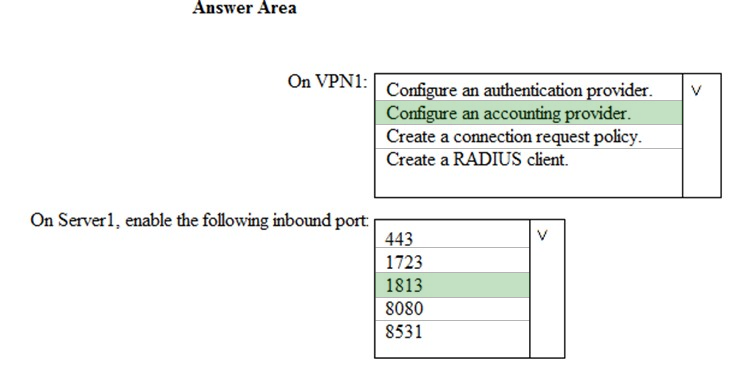
Reference:
https://docs.microsoft.com/en-us/azure-advanced-threat-protection/install-atp-step6-vpn
HOTSPOT -
You have a Microsoft 365 subscription that uses a default domain name of contoso.com.
Microsoft Azure Active Directory (Azure AD) contains the users shown in the following table.
Microsoft Intune has two devices enrolled as shown in the following table:
Both devices have three apps named App1, App2, and App3 installed.
You create an app protection policy named ProtectionPolicy1 that has the following settings:
✑ Protected apps: App1
✑ Exempt apps: App2
✑ Windows Information Protection mode: Block
You apply ProtectionPolicy1 to Group1 and Group3. You exclude Group2 from ProtectionPolicy1.
For each of the following statements, select Yes if the statement is true. Otherwise, select No.
NOTE: Each correct selection is worth one point.
Hot Area:
Correct Answer:
You have a Microsoft 365 tenant.
You have 500 computers that run Windows 10.
You plan to monitor the computers by using Windows Defender Advanced Threat Protection (Windows Defender ATP) after the computers are enrolled in
Microsoft Intune.
You need to ensure that the computers connect to Windows Defender ATP.
How should you prepare Intune for Windows Defender ATP?
- A.Configure an enrollment restriction
- B.Create a device configuration profile
- C.Create a conditional access policy
- D.Create a Windows Autopilot deployment profile
Correct Answer:B
Reference:
https://docs.microsoft.com/en-us/intune/advanced-threat-protection
HOTSPOT -
Your company has a Microsoft 365 subscription that contains the users shown in the following table.
The company implements Windows Defender Advanced Threat Protection (Windows Defender ATP). Windows Defender ATP includes the roles shown in the following table:
Windows Defender ATP contains the machine groups shown in the following table:
For each of the following statements, select Yes if the statement is true. Otherwise, select No.
NOTE: Each correct selection is worth one point.
Hot Area:
Correct Answer:
Should be Yes no Yes
Your company uses Microsoft Azure Advanced Threat Protection (ATP).
You enable the delayed deployment of updates for an Azure ATP sensor named Sensor1.
How long after the Azure ATP cloud service is updated will Sensor1 be updated?
- A. 7 days
- B. 24 hours
- C. 1 hour
- D. 48 hours
- E. 12 hours
Correct Answer: B
Note: The delay period was 24 hours. In ATP release 2.62, the 24 hour delay period has been increased to 72 hours.
DRAG DROP -
You have a Microsoft 365 subscription. All users use Microsoft Exchange Online.
Microsoft 365 is configured to use the default policy settings without any custom rules.
You manage message hygiene.
Where are suspicious email messages placed by default? To answer, drag the appropriate location to the correct message types. Each location may be used once, more than once, or not at all. You may need to drag the split bar between panes or scroll to view content.
Select and Place:

Location choices:
1. ATP quarantine
2. The Junk Email folder of a users's mailbox
3. The Clutter folder a user's mailbox
Questions:
1. Messages that contain word-filtered content.... Location/Answer: The Junk Email folder of a user's mailbox.
2. Messages that are classified as phishing. Location/Answer: ATP quarantine https://docs.microsoft.com/en-us/microsoft-365/security/office-365-security/recommended-settings-for-eop-and-office365-atp?view=o365-worldwide#anti-spam-anti-malware-and-anti-phishing-protection-in-eop
You have a Microsoft 365 subscription.
You create an Advanced Threat Protection (ATP) safe attachments policy to quarantine malware.
You need to configure the retention duration for the attachments in quarantine.
Which type of threat management policy should you create from the Security&Compliance admin center?
- A. ATP anti-phishing
- B. DKIM
- C. Anti-spam
- D. Anti-malware
Correct Answer: D
The correct answer is Anti-Spam policy C. Attachments will be quarantined by Anti-Malware policies, however the only place to configure quarantine retention is in the Anti-Spam policy. See following links for reference.
Your company has 500 computers.
You plan to protect the computers by using Windows Defender Advanced Threat Protection (Windows Defender ATP). Twenty of the computers belong to company executives.
You need to recommend a remediation solution that meets the following requirements:
✑ Windows Defender ATP administrators must manually approve all remediation for the executives
✑ Remediation must occur automatically for all other users
What should you recommend doing from Windows Defender Security Center?
- A. Configure 20 system exclusions on automation allowed/block lists
- B. Configure two alert notification rules
- C. Download an offboarding package for the computers of the 20 executives
- D. Create two machine groups
Correct Answer: D
Reference:
https://docs.microsoft.com/en-us/windows/security/threat-protection/windows-defender-atp/machine-groups-windows-defender-advanced-threat-protection
You have a Microsoft 365 Enterprise E5 subscription.
You use Windows Defender Advanced Threat Protection (Windows Defender ATP).
You need to integrate Microsoft Office 365 Threat Intelligence and Windows Defender ATP.
Where should you configure the integration?
- A. From the Microsoft 365 admin center, select Settings, and then select Services & add-ins.
- B. From the Security & Compliance admin center, select Threat management, and then select Explorer.
- C. From the Microsoft 365 admin center, select Reports, and then select Security & Compliance.
- D. From the Security & Compliance admin center, select Threat management and then select Threat tracker.
Correct Answer: B
References:
https://docs.microsoft.com/en-us/office365/securitycompliance/integrate-office-365-ti-with-wdatp
Your network contains an on-premises Active Directory domain. The domain contains servers that run Windows Server and have advanced auditing enabled.
The security logs of the servers are collected by using a third-party SIEM solution.
You purchase a Microsoft 365 subscription and plan to deploy Azure Advanced Threat Protection (ATP) by using standalone sensors.
You need to ensure that you can detect when sensitive groups are modified and when malicious services are created.
What should you do?
- A. Configure auditing in the Office 365 Security & Compliance center.
- B. Turn off Delayed updates for the Azure ATP sensors.
- C. Modify the Domain synchronizer candidate's settings on the Azure ATP sensors.
- D. Integrate SIEM and Azure ATP.
Correct Answer: C
References:
https://docs.microsoft.com/en-us/azure-advanced-threat-protection/install-atp-step5
What should you do?
- A. Configure Event Forwarding on the domain controllers
- B. Configure auditing in the Office 365 Security & Compliance center.
- C. Turn on Delayed updates for the Azure ATP sensors.
- D. Enable the Audit account management Group Policy setting for the servers.
Correct Answer: A
Reference:
https://docs.microsoft.com/en-us/azure-advanced-threat-protection/configure-event-forwarding
You have a Microsoft 365 subscription that uses a default domain name of fabrikam.com.
You create a safe links policy, as shown in the following exhibit.
Which URL can a user safely access from Microsoft Word Online?
- A. fabrikam.phishing.fabrikam.com
- B. malware.fabrikam.com
- C. fabrikam.contoso.com
- D. www.malware.fabrikam.com
Correct Answer: D
References:
https://docs.microsoft.com/en-us/office365/securitycompliance/set-up-a-custom-blocked-urls-list-wtih-atp
HOTSPOT -
You have a Microsoft 365 subscription that uses a default name of litwareinc.com.
You configure the Sharing settings in Microsoft OneDrive as shown in the following exhibit.

Use the drop-down menus to select the answer choice that completes each statement based on the information presented in the graphic.
NOTE: Each correct selection is worth one point.
Hot Area:
Correct Answer: 
References:
https://docs.microsoft.com/en-us/onedrive/manage-sharing
Several users in your Microsoft 365 subscription report that they received an email message without attachment.
You need to review the attachments that were removed from the messages.
Which two tools can you use? Each correct answer presents a complete solution.
NOTE: Each correct selection is worth one point.
- A.the Exchange admin center
- B.the Azure ATP admin center
- C.Outlook on the web
- D.the Security & Compliance admin center
- E.Microsoft Azure Security Center
Correct Answer:AD
References:
https://docs.microsoft.com/en-us/office365/securitycompliance/manage-quarantined-messages-and-files
Use the Security & Compliance Center to manage quarantined email messages Use Exchange Online PowerShell or standalone EOP PowerShell to view and manage quarantined messages and files
You have a Microsoft 365 subscription that contains several Windows 10 devices. The devices are managed by using Microsoft Intune.
You need to enable Windows Defender Exploit Guard (Windows Defender EG) on the devices.
Which type of device configuration profile should you use?
- A. Endpoint protection
- B. Device restrictions
- C. Identity protection
- D. Windows Defender ATP
Correct Answer: A
References:
https://docs.microsoft.com/en-us/intune/endpoint-protection-windows-10
DRAG DROP -
You have a Microsoft 365 E5 subscription.
All computers run Windows 10 and are onboarded to Windows Defender Advanced Threat Protection (Windows Defender ATP).
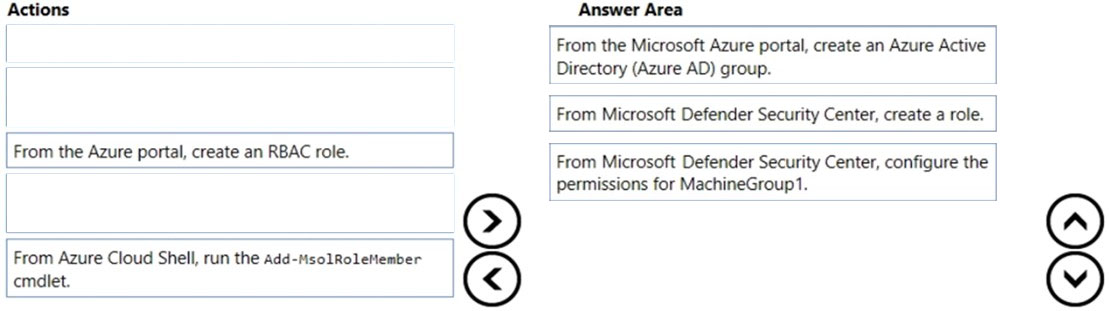
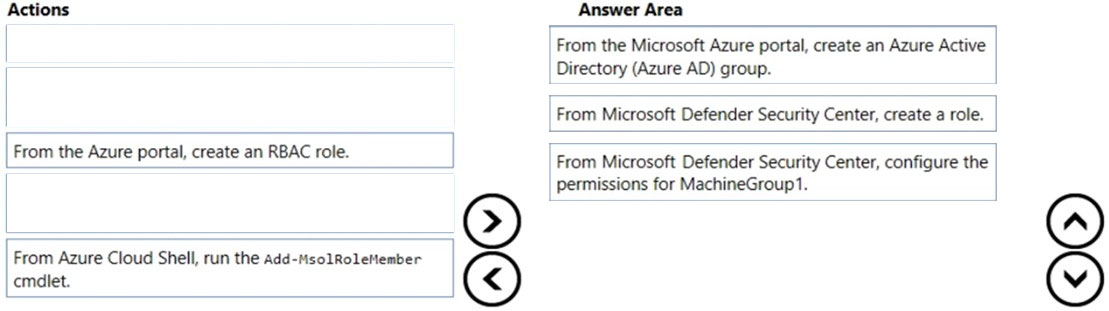
You create a Windows Defender machine group named MachineGroup1.
You need to enable delegation for the security settings of the computers in MachineGroup1.
Which three actions should you perform in sequence? To answer, move the appropriate actions from the list of actions to the answer area and arrange them in the correct order.
Select and Place:
Correct Answer: 
You have a hybrid Microsoft Exchange Server organization. All users have Microsoft 365 E5 licenses.
You plan to implement an Advanced Threat Protection (ATP) anti-phishing policy.
You need to enable mailbox intelligence for all users.
What should you do first?
- A. Configure attribute filtering in Microsoft Azure Active Directory Connect (Azure AD Connect)
- B. Purchase the ATP add-on
- C. Select Directory extension attribute sync in Microsoft Azure Active Directory Connect (Azure AD Connect)
- D. Migrate the on-premises mailboxes to Exchange Online
Correct Answer: D
References:
https://docs.microsoft.com/en-us/office365/securitycompliance/set-up-anti-phishing-policies
HOTSPOT -
You have a Microsoft Azure Active Directory (Azure AD) tenant named contoso.com.
Four Windows 10 devices are joined to the tenant as shown in the following table.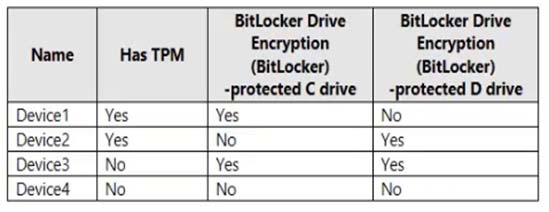
On which devices can you use BitLocker To Go and on which devices can you turn on auto-unlock? To answer, select the appropriate options in the answer area.
NOTE: Each correct selection is worth one point.
Hot Area:
Correct Answer: 
Topic 3 - Question Set 3
HOTSPOT -
You have the Microsoft conditions shown in the following table.
You have the Azure Information Protection labels shown in the following table.
You have the Azure Information Protection policies shown in the following table.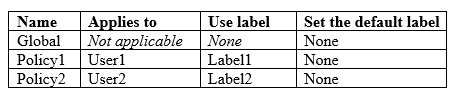
For each of the following statements, select Yes if the statement is true. Otherwise, select No.
Hot Area:

Answer: a user should be a user1.
If a user types "Product1 and Product2" in a document and saves the documents in Microsoft Word, the document will be assigned Label1 sensitity automatcally "NO"
If a user types "Product2 and Product1" in a document and saves the documents in Microsoft Word, the document will be assigned Label2 sensitity automatcally "YES"
If a user types "Product2" in a document and save the document in Microsoft Word, the document will be assigned Label2 sensitivy automatucally "NO"
How multiple conditions are evaluated when they apply to more than one label. The labels are ordered for evaluation, according to their position that you specify in the policy: The label positioned first has the lowest position (least sensitive) and the label positioned last has the highest position (most sensitive). The most sensitive label is applied. The last sublabel is applied.
HOTSPOT -
Your company has a Microsoft 365 subscription, a Microsoft Azure subscription, and an Azure Active Directory (Azure AD) tenant named contoso.com.
The company has the offices shown in the following table.
The tenant contains the users shown in the following table.
You create the Microsoft Cloud App Security policy shown in the following exhibit.
For each of the following statements, select Yes if the statement is true. Otherwise, select No.
NOTE: Each correct selection is worth one point.

*) In Montreal, user1 downloads 40 files in 30 seconds, an alert will be created - YES
*) In Seattle, user2 downloads 1 file per second for 2 minutes, an alert will be created - YES
*) In New York, user2 downloads 40 files in 10 seconds, an alert will be created - NO.
HOTSPOT -
You have a Microsoft 365 subscription.
You identify the following data loss prevention (DLP) requirements:
✑ Send notifications to users if they attempt to send attachments that contain EU social security numbers
✑ Prevent any email messages that contain credit card numbers from being sent outside your organization
✑ Block the external sharing of Microsoft OneDrive content that contains EU passport numbers
✑ Send administrators email alerts if any rule matches occur.
What is the minimum number of DLP policies and rules you must create to meet the requirements? To answer, select the appropriate options in the answer area.
NOTE: Each correct selection is worth one point.
Hot Area: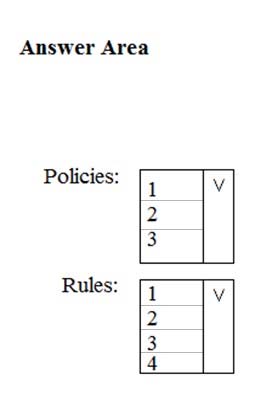
Correct Answer: 
You have three different actions, hence you need three different policies. Three different policies get three different rules.
1st requirement is not location specific and 2nd requirement is location specific (outside your organisation). Therefore two different policies for Exchange required. Another Policy required for OneDrive, so 3 Policies.
https://www.examtopics.com/exams/microsoft/ms-500/view/12/
Topic 4 - Question Set 4
You have a Microsoft 365 subscription.
The Global administrator role is assigned to your user account. You have a user named Admin1.
You create an eDiscovery case named Case1.
You need to ensure that Admin1 can view the results of Case1.
What should you do first?
- A.From the Azure Active Directory admin center, assign a role group to Admin1.
- B.From the Microsoft 365 admin center, assign a role to Admin1.
- C.From Security & Compliance admin center, assign a role group to Admin1.
Correct Answer:C
Reference:
https://docs.microsoft.com/en-us/office365/securitycompliance/assign-ediscovery-permissions
correct. Only security and complaince centre includes permission role i.e edisocvery manger in order to see cases
HOTSPOT -
You have a Microsoft 365 subscription. From the Security & Compliance admin center, you create the retention policies shown in the following table.
Policy1 if configured as showing in the following exhibit.
Policy2 is configured as shown in the following exhibit.
For each of the following statements, select Yes if the statement is true. Otherwise, select No.
Hot Area:
Options:
1. If a user create a file in Microsoft OneDrive on January 1, 2018, users can access the file on January 15, 2019:
2. If a user deletes a Microsoft OneDrive file created on January 1, 2018, an administrator can recover the file on April 15, 2019:
3. If a user deletes a Microsoft OneDrive file created on January 1, 2018, an administrator can recover the file on April 15, 2022:
Answers:
YES. If a user creates a file in MS OneDrive on Jan 1, 2018, users can access the file on Jan 15, 2019
YES. If a user deletes a MS OneDrive file created on Jan 1, 2018, and admin can recover the file on April 15, 2019
NO. If a user deleted a MS OneDrive tile created on Jan 1, 2018 an admin can recover the file on April 15 2022.
You have a Microsoft 365 subscription.
You need to enable auditing for all Microsoft Exchange Online users.
What should you do?
- A. From the Exchange admin center, create a journal rule
- B. Run the Set-MailboxDatabase cmdlet
- C. Run the Set-Mailbox cmdlet
- D. From the Exchange admin center, create a mail flow message trace rule.
Correct Answer: C
Reference:
https://docs.microsoft.com/en-us/office365/securitycompliance/enable-mailbox-auditing
HOTSPOT -
You view Compliance Manager as shown in the following exhibit.
Use the drop-down menus to select the answer choice that completes each statement based on the information presented in the graphic.
NOTE: Each correct selection is worth one point.
Hot Area:
Correct Answer: 
Reference:
https://docs.microsoft.com/en-us/office365/securitycompliance/meet-data-protection-and-regulatory-reqs-using-microsoft-cloud
Question 3
HOTSPOT -
You have an Azure Active Directory (Azure AD) tenant named contoso.com that contains the users shown in the following table.
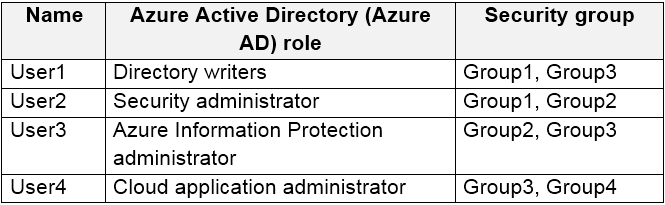
You register devices in contoso.com as shown in the following table.
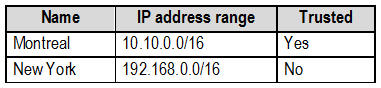
You create app protection policies in Intune as shown in the following table.
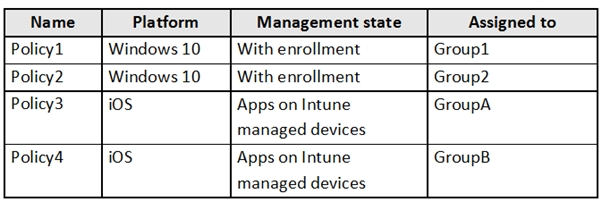
For each of the following statements, select Yes if the statement is true. Otherwise, select No.
NOTE: Each correct selection is worth one point.
Hot Area:
You have a Microsoft 365 subscription.
All computers run Windows 10 Enterprise and are managed by using Microsoft Intune.
You plan to view only security-related Windows telemetry data.
You need to ensure that only Windows security data is sent to Microsoft.
What should you create from the Intune admin center?
- A. a device configuration profile that has device restrictions configured
- B. a device configuration profile that has the Endpoint Protection settings configured
- C. a device configuration policy that has the System Security settings configured
- D. a device compliance policy that has the Device Health settings configured
Correct Answer: A
Reference:
https://docs.microsoft.com/en-us/intune/device-restrictions-windows-10#reporting-and-telemetry
You create a label that encrypts email data. Users report that they cannot use the label in Outlook on the web to protect the email messages they send.
You need to ensure that the users can use the new label to protect their email.
What should you do?
- A. Modify the priority order of label policies
- B. Wait six hours and ask the users to try again
- C. Create a label policy
- D. Create a new sensitive information type
Correct Answer: B (it should be C)
You have a Microsoft 365 subscription that includes a user named Admin1.
You need to ensure that Admin1 can preserve all the mailbox content of users, including their deleted items.
The solution must use the principle of least privilege.
What should you do?
- A. From the Microsoft 365 admin center, assign the Exchange administrator role to Admin1.
- B. From the Exchange admin center, assign the Discovery Management admin role to Admin1.
- C. From the Azure Active Directory admin center, assign the Service administrator role to Admin1.
- D. From the Exchange admin center, assign the Recipient Management admin role to Admin1.
Correct Answer: B
You have a hybrid Microsoft 365 environment.
All computers run Windows 10 Enterprise and have Microsoft Office 365 ProPlus installed. All the computers are joined to Active Directory.
You have a server named Server1 that runs Windows Server 2016. Server1 hosts the telemetry database. You need to prevent private details in the telemetry data from being transmitted to Microsoft.
What should you do?
- A. On Server1, run readinessreportcreator.exe
- B. Configure a registry on Server1
- C. Configure a registry on the computers
- D. On the computers, run tdadm.exe
Correct Answer: C
Your company has a Microsoft 365 subscription that includes a user named User1.
You suspect that User1 sent email messages to a competitor detailing company secrets.
You need to recommend a solution to ensure that you can review any email messages sent by User1 to the competitor, including sent items that were deleted.
What should you include in the recommendation?
- A. Enable In-Place Archiving for the mailbox of User1
- B. From the Security & Compliance, perform a content search of the mailbox of User1
- C. Place a Litigation Hold on the mailbox of User1
- D. Configure message delivery restrictions for the mailbox of User1
Correct Answer: C
You have a Microsoft 365 subscription.
Yesterday, you created retention labels and published the labels to Microsoft Exchange Online mailboxes.
You need to ensure that the labels will be available for manual assignment as soon as possible.
What should you do?
- A. From the Security & Compliance admin center, create a label policy
- B. From Exchange Online PowerShell, run Start-RetentionAutoTagLearning
- C. From Exchange Online PowerShell, run Start-ManagedFolderAssistant
- D. From the Security & Compliance admin center, create a data loss prevention (DLP) policy
Correct Answer: C
You have a Microsoft 365 subscription.
You create a retention policy and apply the policy to Exchange Online mailboxes.
You need to ensure that the retention policy tags can be assigned to mailbox items as soon as possible.
What should you do?
- A. From Exchange Online PowerShell, run Start-RetentionAutoTagLearning
- B. From Exchange Online PowerShell, run Start-ManagedFolderAssistant
- C. From the Security & Compliance admin center, create a data loss prevention (DLP) policy
- D. From the Security & Compliance admin center, create a label policy
Correct Answer: D--Wrong,
References:
https://docs.microsoft.com/en-us/office365/securitycompliance/labels
You have a site collection named SiteCollection1 that contains a site named Site2. Site2 contains a document library named Customers.
Customers contains a document named Litware.docx. You need to remove Litware.docx permanently.
Which three actions should you perform in sequence? To answer, move the appropriate actions from the list of actions to the answer area and arrange them in the correct order.


You have a Microsoft 365 subscription.
You have a user named User1. Several users have full access to the mailbox of User1.
Some email messages sent to User1 appear to have been read and deleted before the user viewed them.
When you search the audit log in Security & Compliance to identify who signed in to the mailbox of User1, the results are blank.
You need to ensure that you can view future sign-ins to the mailbox of User1.
You run the Set-Maibox -Identity "User1" -AuditEnabled $true command.
Does that meet the goal?
- A. Yes
- B. No
Correct Answer: A
References:
https://docs.microsoft.com/en-us/powershell/module/exchange/mailboxes/set-mailbox?view=exchange-ps
You run the Set-AuditConfig -Workload Exchange command.
Does that meet the goal?
- A.Yes
- B.No
Correct Answer:B
You run the Set-AdminAuditLogConfig -AdminAuditLogEnabled $true command.
-AdminAuditLogCmdlets *Mailbox*
Does that meet the goal?
- A.Yes
- B.No
Correct Answer:B
References:
https://docs.microsoft.com/en-us/powershell/module/exchange/policy-and-compliance-audit/set-adminauditlogconfig?view=exchange-ps
You have a Microsoft 365 subscription.
You have a Microsoft SharePoint Online site named Site1. The files in Site1 are protected by using Microsoft Azure Information Protection.
From the Security & Compliance admin center, you create a label that designates personal data.
You need to auto-apply the new label to all the content in Site1.
What should you do first?
- A. From PowerShell, run Set-ManagedContentSettings.
- B. From PowerShell, run Set-ComplianceTag.
- C. From the Security & Compliance admin center, create a Data Subject Request (DSR).
- D. Remove Azure Information Protection from the Site1 files.
Correct Answer: D
References:
https://docs.microsoft.com/en-us/office365/securitycompliance/apply-labels-to-personal-data-in-office-365
Sensitivity labels are currently recommended for applying labels to files on premises and in other cloud services and providers. These are also recommended for files in Microsoft 365 that require Azure Information Protection encryption for data protection, such as trade secret files.
At this time, using Azure Information Protection to apply encryption is not recommended for files in Microsoft 365 with data that is subject to the GDPR. Microsoft 365 services currently cannot read into AIP-encrypted files. Therefore, the service can't find sensitive data in these files.
If there are multiple rules that assign an auto-apply label and content meets the conditions of multiple rules, the label for the oldest rule is assigned. For this reason, it's important to plan the label policies carefully before configuring them. If an organization requires a change to the priority of the label policies, they'll need to delete and recreate them.
You have a Microsoft 365 subscription.
You need to be notified by email whenever an administrator starts an eDiscovery search.
What should you do from the Security & Compliance admin center?
- A.From Search & investigation, create a guided search.
- B.From Events, create an event.
- C.From Alerts, create an alert policy.
- D.From Search & investigation, create an eDiscovery case.
Correct Answer:C
References:
https://docs.microsoft.com/en-us/office365/securitycompliance/alert-policies
You have a Microsoft 365 subscription.
A security manager receives an email message every time a data loss prevention (DLP) policy match occurs.
You need to limit alert notifications to actionable DLP events.
What should you do?
- A. From the Security & Compliance admin center, modify the Policy Tips of a DLP policy.
- B. From the Cloud App Security admin center, apply a filter to the alerts.
- C. From the Security & Compliance admin center, modify the User overrides settings of a DLP policy.
- D. From the Security & Compliance admin center, modify the matched activities threshold of an alert policy.
Correct Answer: D
References:
https://docs.microsoft.com/en-us/office365/securitycompliance/alert-policies
When the alert is triggered - You can configure a setting that defines how often an activity can occur before an alert is triggered. This allows you to set up a policy to generate an alert every time an activity matches the policy conditions, when a certain threshold is exceeded, or when the occurrence of the activity the alert is tracking becomes unusual for your organization. Source: https://docs.microsoft.com/en-us/microsoft-365/compliance/alert-policies?view=o365-worldwide
HOTSPOT -
You have a Microsoft 365 subscription. Auditing is enabled.
A user named User1 is a member of a dynamic security group named Group1.
You discover that User1 is no longer a member of Group1.
You need to search the audit log to identify why User1 was removed from Group1.
Which two actions should you use in the search? To answer, select the appropriate activities in the answer area.
NOTE: Each correct selection is worth one point.
Hot Area:
Correct Answer: 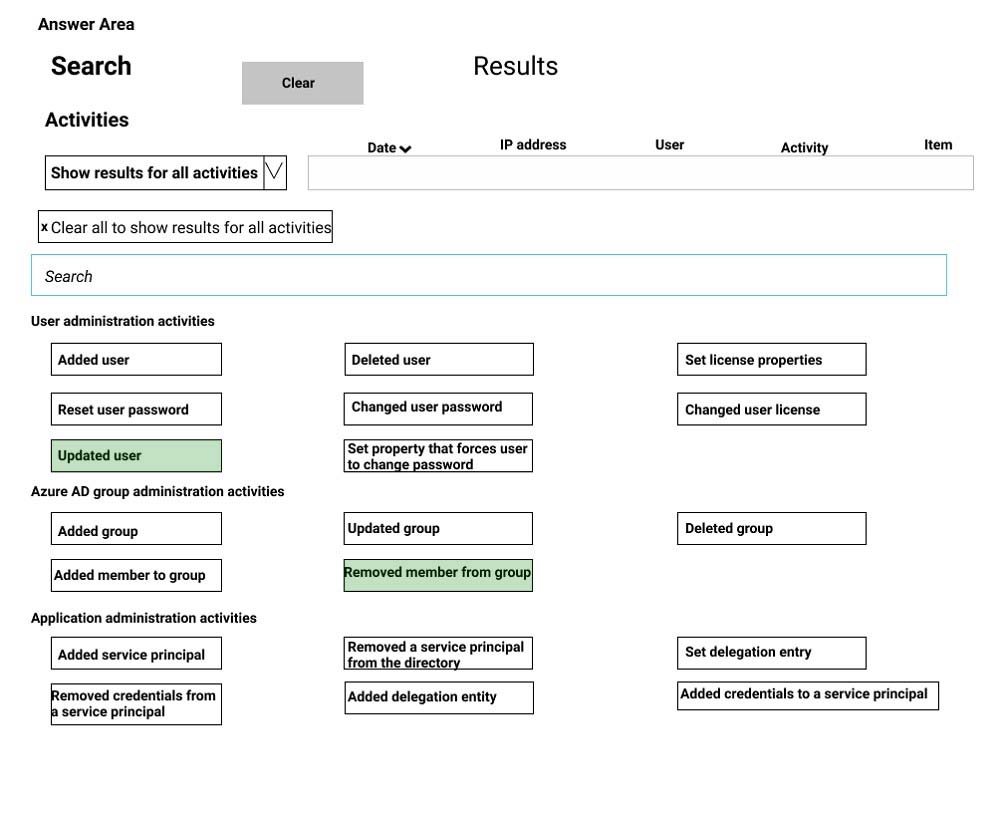
References:
https://docs.microsoft.com/en-us/office365/securitycompliance/search-the-audit-log-in-security-and-compliance
Answer is:
-Removed member from group
-Updated group
"Updated User" yields no results!
Removed member from group: => shows the user that was removed (by modifying dynamic the query) Updated group => shows what user 'updated' the group.
You have a Microsoft 365 subscription.
You create and run a content search from the Security & Compliance admin center.
You need to download the results of the content search.
What should you obtain first?
- A.an export key
- B.a password
- C.a certificate
- D.a pin
Correct Answer:A
References:
https://docs.microsoft.com/en-us/office365/securitycompliance/export-search-results
Definitely not made rightfully clear, but the answer is in the URL, as step#2 under "Step 2: Download the search results" :: * Under Export key, click Copy to clipboard. You use this key in step 5 to download the search results.
HOTSPOT -
You have a Microsoft 365 subscription that include three users named User1, User2, and User3.
A file named File1.docx is stored in Microsoft OneDrive. An automated process updates File1.docx every minute.
You create an alert policy named Policy1 as shown in the following exhibit.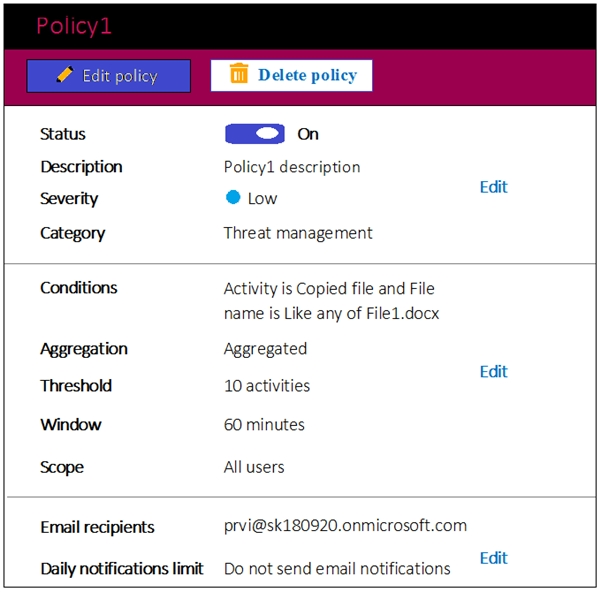
Use the drop-down menus to select the answer choice that completes each statement based on the information presented in the graphic.
NOTE: Each correct selection is worth one point.
Hot Area:
Correct Answer:
References:
https://docs.microsoft.com/en-us/office365/securitycompliance/alert-policies
Answer is correct. It checks for the threshold (10) after 60mins, the cycle for checks is 60mins. If it's not up to 10 after every 60mins, it will not send alert.
HOTSPOT -
You have a Microsoft 365 subscription.
You create a retention label named Label1 as shown in the following exhibit.
You publish Label1 to SharePoint sites.
Use the drop-down menus to select the answer choice that completes each statement based on the information presented in the graphic.
NOTE: Each correct selection is worth one point.
Hot Area: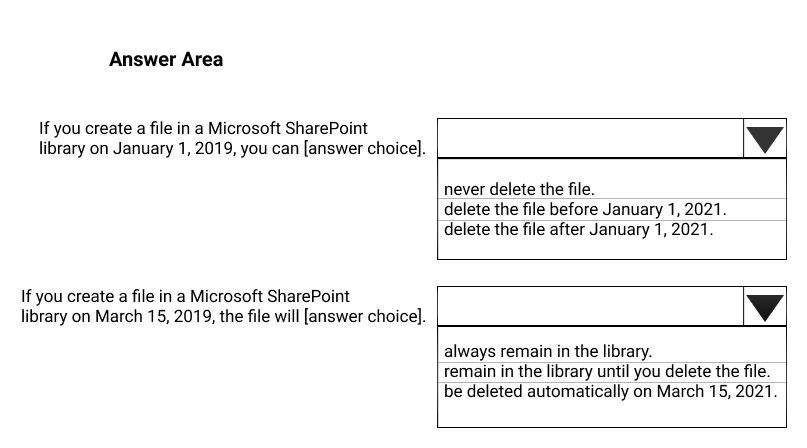
Correct Answer: 
References:
https://docs.microsoft.com/en-us/office365/securitycompliance/labels
Correct answer is:
1. never delete the file - because of: Use Label to classify content as "Record"
2. be deleted automatically on March 15, 2021
Explanation: Additionally, retention labels support records management for email and documents across Microsoft 365 apps and services. You can use a retention label to classify content as a record. When this happens, the label can't be changed or removed, and the content can't be edited or deleted. Source: https://docs.microsoft.com/en-us/microsoft-365/compliance/labels?view=o365-worldwide
Items labels AS a record Will not be deleated until the label is removed from the item. Since the retention policy want to delete the item after x days, that Wont happen. Only admin Can manuelt remove the record label.= answer is correct never deleated. Records are immutable, and labels cant be removed. It will auto-delete after expiry. https://docs.microsoft.com/en-us/microsoft-365/compliance/records?view=o365-worldwide
You have a Microsoft 365 subscription.
You need to ensure that users can manually designate which content will be subject to data loss prevention (DLP) policies.
What should you create first?
- A. A retention label in Microsoft Office 365
- B. A custom sensitive information type
- C. A Data Subject Request (DSR)
- D. A safe attachments policy in Microsoft Office 365
Correct Answer: C
References:
https://docs.microsoft.com/en-us/office365/securitycompliance/manage-gdpr-data-subject-requests-with-the-dsr-case-tool#more-information-about-using-the-dsr- case-tool
You have a Microsoft 365 subscription.
A user reports that changes were made to several files in Microsoft OneDrive.
You need to identify which files were modified by which users in the user's OneDrive.
What should you do?
- A. From the Azure Active Directory admin center, open the audit log
- B. From the OneDrive admin center, select Device access
- C. From Security & Compliance, perform an eDiscovery search
- D. From Microsoft Cloud App Security, open the activity log
Correct Answer: D
Reference:
https://docs.microsoft.com/en-us/cloud-app-security/activity-filters
Cloud App Security - > Activity log , filtered by OneDrive